Digital twin software: How to simulate your plant efficiently
With a digital twin, you create a digital replica of your plant or machine — for example, based on CAD design data. This simulation behaves exactly like its real-world counterpart. This allows all processes to be virtually tested and optimized in real time before the hardware is even built. This ensures layout planning, shortens development and software programming, enables risk-free system training, and facilitates future modifications and system optimizations — for a seamless digital value chain.
Learn here how Digital Twins are successfully used in automotive, logistics, manufacturing, and other industries — and how you can use our software to advance your project and the digitalization of your processes.
Content: What you will find on this page
- Definition: Digital twin
- Software: Features of fe.screen-sim
- Examples: Usage in industries
- Webinar: Live creation of digital twins
- Interview on implementation and time planning
- Frequently asked questions and answers
- Start phase: workshop, training, project support
Definition: Digital twin briefly explained
The usage
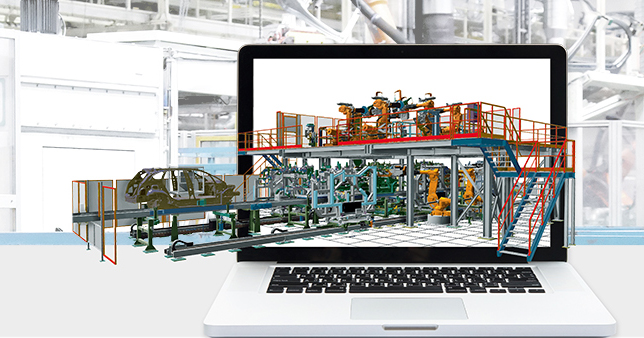
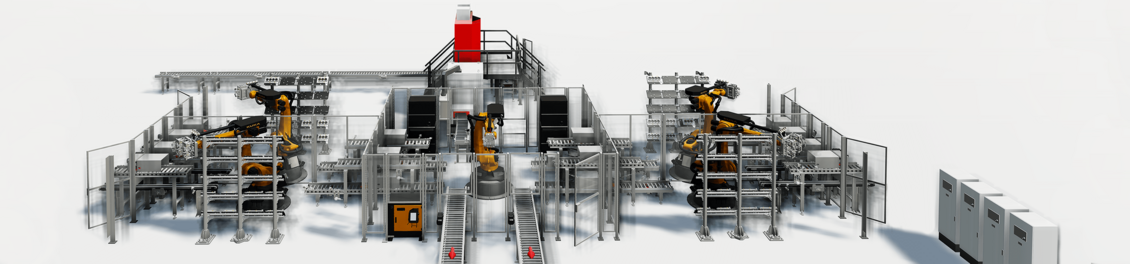
A digital twin is a 3D simulation model of a plant or machine that virtually represents its properties and behavior. These are employed in numerous application areas— one of the most important being virtual commissioning. The digital twin is used to validate the control code (PLC), for simulation during the planning and design of mechanical components while considering dynamic variables for the kinematic verification of the mechanics, and for process simulation to plan the entire material flow.
The software
Digital twins are now used in many industries — such as automotive and mechanical engineering, automation, and logistics — and are increasingly being specified in tenders. Decision-makers are looking for future-proof, industry-agnostic, and high-performance digital twin software for a wide range of applications. This is where F.EE’s fe.screen-sim software comes in. Thanks to its modular software architecture and flexible expansion options, it is suitable for both smaller and highly complex projects. This allows for the seamless implementation of up to 100,000 elements in a single simulation featuring 16 controllers, 700 drives, and approximately 150,000 inputs and outputs.
The benefit
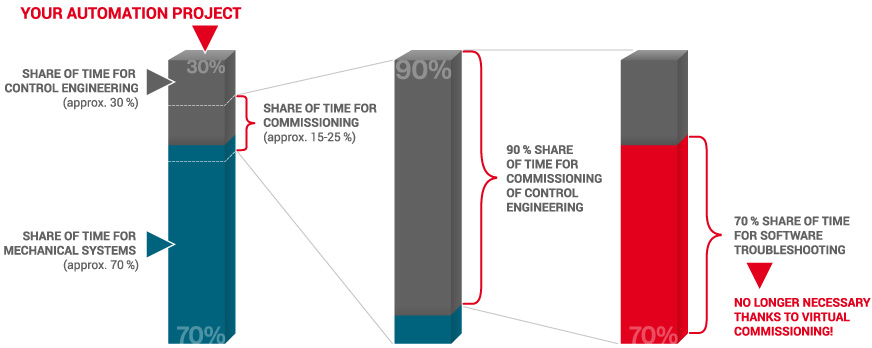
The use of a digital twin leads to significant cost and resource savings during subsequent on-site commissioning. One reason: Programming errors are detected as early as the planning and development phase. Thanks to early error correction, the entire project is implemented much more smoothly, quickly, and with significantly less project stress during the implementation phase. Digital twins are also used for optimization and training, so that the plant or machine does not have to be taken out of service for these purposes. The virtual twin thus accompanies your real hardware over the long term throughout its entire lifecycle.
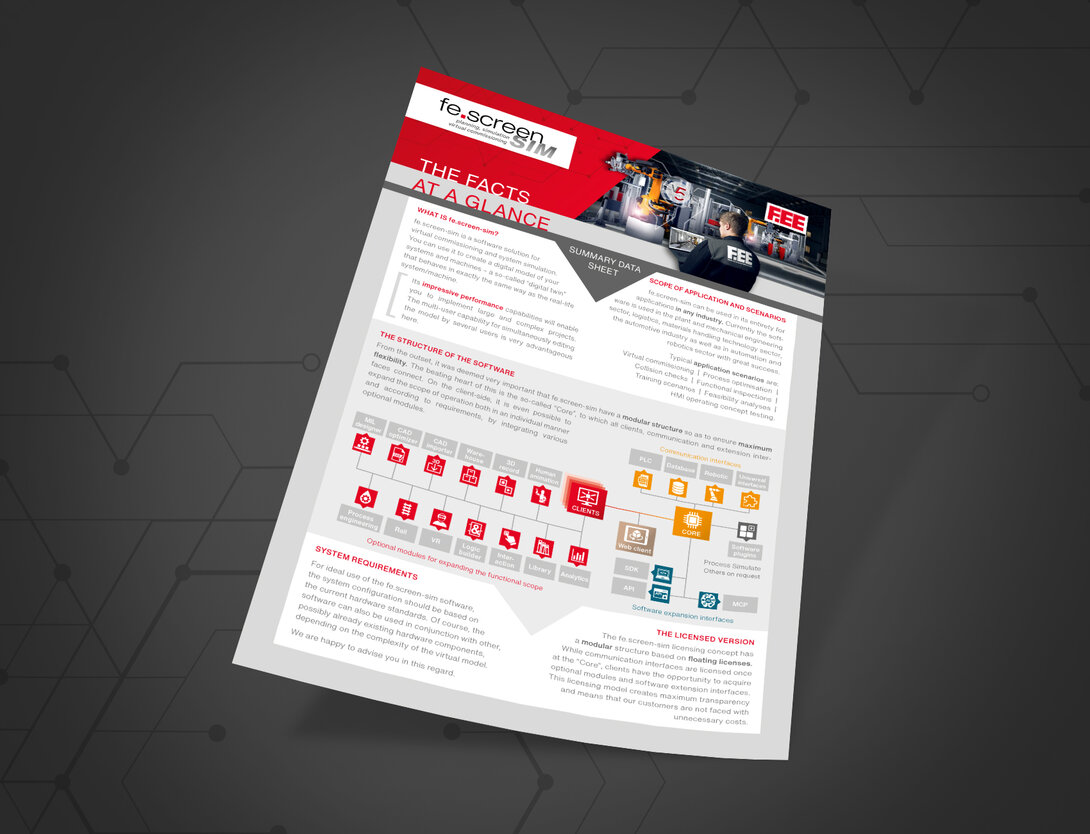
Digital Twin Software: Features and interfaces of fe.screen-sim at a glance
Interfaces to Third-Party Systems
- Control systems: Siemens, Rockwell, B&R, Beckhoff, Bosch, CODESYS Simulation Interface (add-on, preview), Fanuc, Mitsubishi, and Omron.
- Robotics: ABB, Denso, Epson, ESTUN, Fanuc, isel, Kawasaki, KUKA, Mitsubishi, NACHI, RoboDK, Stäubli, Universal Robots, and Yaskawa (others available upon request).
- Databases and universal interfaces: e.g., OPC UA, MQTT, Modbus, SQL.
- Software plugins: Process Simulate (others available upon request).
What makes fe.screen-sim unique
- AI integration via MCP for the automatic generation, control, analysis, and optimization of models using AI systems.
- Non-stop multi-user simulation – multiple users can work non-stop and simultaneously on the same digital twin – regardless of location and without switching between editing and simulation.
- Outstanding performance and maximum scalability, even for highly complex large-scale plants.
- Over 30 interfaces—cross-vendor compatible, as well as open API and SDK interfaces.
- Experience the plant realistically via virtual reality—perfect for optimizing layout planning and for training purposes.
Features at a Glance
- Integrated user and group management.
- Integrated library functions for behavioral and CAD models—including support for custom extensions.
- Logic creation in FUP and C#.
- Graphic Assign: Simple, automated assignment of connections, e.g., between variables and simulation elements.
- Innovative editors for easy and post-processing of materials, models, and physics.
- Automated signal mapping of I/Os from the PLC to the model using the Expression Editor.
- Integrated signal recorder.
- CAD import: Support for over 30 CAD formats, including native support for the most common CAD systems—such as SolidWorks, AUTODESK, Siemens, etc.
- “CAD Optimizer” for rapid preparation and optimization of CAD data.
- Web client: Simulation directly in the browser—without local installation.
- MIL designer: A tool that allows you to automatically simulate and test processes even without a connected controller.
- Analytics: Effective data and cycle time analysis on the digital twin.
- Time control for displaying processes in slow motion or time-lapse.
- Integrated physical calculation of friction, speed, etc.
- “emulation.box” for easy emulation of up to 700 fieldbus devices.
Performance
More than…
- … 100,000 elements in one simulation
- … 20 control systems
- … 20 robots
- … 700 drives
- … 150,000 inputs and outputs
Simulatable technologies and products
- Conveyor technology: Rotary tables, lifts, chain conveyors, etc.
- Electronic overhead conveyors (EHB): Switches, trolleys, etc.
- Automated guided vehicles (AGVs): Conveyor trains, trolleys, etc.
- Robotics: Robots, tools, grippers, etc.
- Control cabinet components: Pushbuttons, fuses, motor protection, etc.
- Logistics applications: Large warehouses with Power&Free or conventional conveyor systems
- Human animation: E.g., worker simulation in assembly cells


This is why companies choose us
High Performance
We develop digital twins for you with up to 100,000 elements. Our software features interfaces to control systems, all common robot systems, databases, and universal interfaces. Thanks to its maximum scalability, fe.screen-sim is particularly well-suited for complex plants and machines.
Joint creating
Thanks to its multi-user capability and integrated user and group administration, several users can work on the simulation project concurrently without switching between editing and simulation modes. AI integration and visualization via VR/AR glasses ensure additional efficiency and maximum realism.
Transparent licensing
Our Digital Twin software features a modular and transparent design. As a user, you only license the features you need. This gives you complete clarity and helps you avoid unnecessary costs. You can use your simulation indefinitely, for example for training and optimization purposes. Pay-as-you-Grow for maximum economic efficiency.
Testimonial

"The simulation program enables us to influence the design already in the project planning phase. Possible weak points in the plant layout are recognized in advance. Thanks to fe.screen-sim, the commissioning times of our plants could be significantly reduced".
Thomas Ostheimer, Managing director of ATTEC Automation GmbH
Examples for digital twins: Use Cases
Usage in plant and machine construction
Our simulation software has already been successfully used for conveyor systems, packaging systems, machine tools and many other systems and machines.
Use case automotive industry
Digital twins are also used in the automotive industry for many machines and systems. For example, in chassis assembly and in body construction.
MORE INFORMATION ABOUT DIGITAL TWINS IN THE AUTOMOTIVE INDUSTRY
Digital twins in logistics
Digital twins are also created in logistics. For example for packaging systems, sorting systems and storage and retrieval machines. Here too, project complexity plays an important role.
Simulation models in automation
In modern industry, the demands on automation systems are also increasing. Ever wider product ranges are being produced on systems and machines. A challenge in planning and development. Here a digital twin helps to test many scenarios and applications.
Digital twin of an Audi plant
In this video, watch the digital twin of an exemplary plant of the car manufacturer Audi, which was created with the help of our fe.screen-sim software. In its function of virtual commissioning of plants and machines, our software brings many advantages with it, because even with complex plants it still offers users high performance. The video impressively shows how virtual commissioning is still possible even with 23 KUKA OfficeLite instances with a continuous connection of six people, each with their own clients.
Creating a digital twin: Your personal contact person
Your personal contact person – for more clearness
You are a project or department manager and are faced with the question of how to set up a digital twin for your project? We would be happy to talk to you personally about your requirements, the time frame, the possible project approach and give you an initial cost estimate.
FAQ about digital twins
When should a digital twin be used?
A digital twin should be used as early as possible in the engineering phase. Ideally, the simulation model is used as early as the planning phase, for example to check processes with regard to feasibility. During the process, the model is then enriched with more and more data. This diagram illustrates the time period.

How does a digital twin help me with a bidding process?
With more and more requests for proposals, the creation of a digital twin is required. Companies applying for the contract need a suitable solution. If no tool or a specific provider is specified, those responsible are faced with the task of selecting a suitable digital twin software. We would be happy to talk to you personally about your requirements and your time schedule.
How quickly can a digital twin be created?
The time scale depends on various factors, including the complexity and level of detail of the simulation model and products. The technical skills and time resources of your staff also play an important role. After a personal conversation we will be happy to give you an initial cost estimate.
Will a digital twin help me with digitisation?
In the context of modern networked industry, a digital twin is a key tool. The use of simulation tools brings numerous advantages. In addition to significantly faster commissioning, the transparency of technical features is significantly increased and product development times are shortened. Companies that use digital twins win additional orders, as studies have shown.
We will not leave you alone with your first project - our services
If you are using a digital twin for the first time, our specialists will help you in all project phases. For a typical startup phase with fe.screen-sim, we offer the following services: Initial workshop, training and support during the final project implementation.